

Home / Detective board maker
Create a Detective or Clue Board Online
Pin photos to a wall, scribble notes in the margins and join the clues with red string, the way detectives do on screen. AnacapaChart gives you that board in your browser, free, with no sign-up. It suits mystery writers, game masters, true-crime fans and students.
What you can add
- Photos and suspects. Drop in photos or write a name on a note. Give each a category and a status so you can see what is confirmed and what is a hunch.
- Clue notes. Short handwritten-style notes for clues, questions and alibis, in colours you choose.
- Red string. Connect any two cards. Label the string, or make it dashed when the link is only a suspicion.
- Frames. Draw a labelled frame around a group, such as the people at the party or the objects found in the house.
- Redaction bars and pen. Black out a detail with a redaction bar, or circle something with the pen.
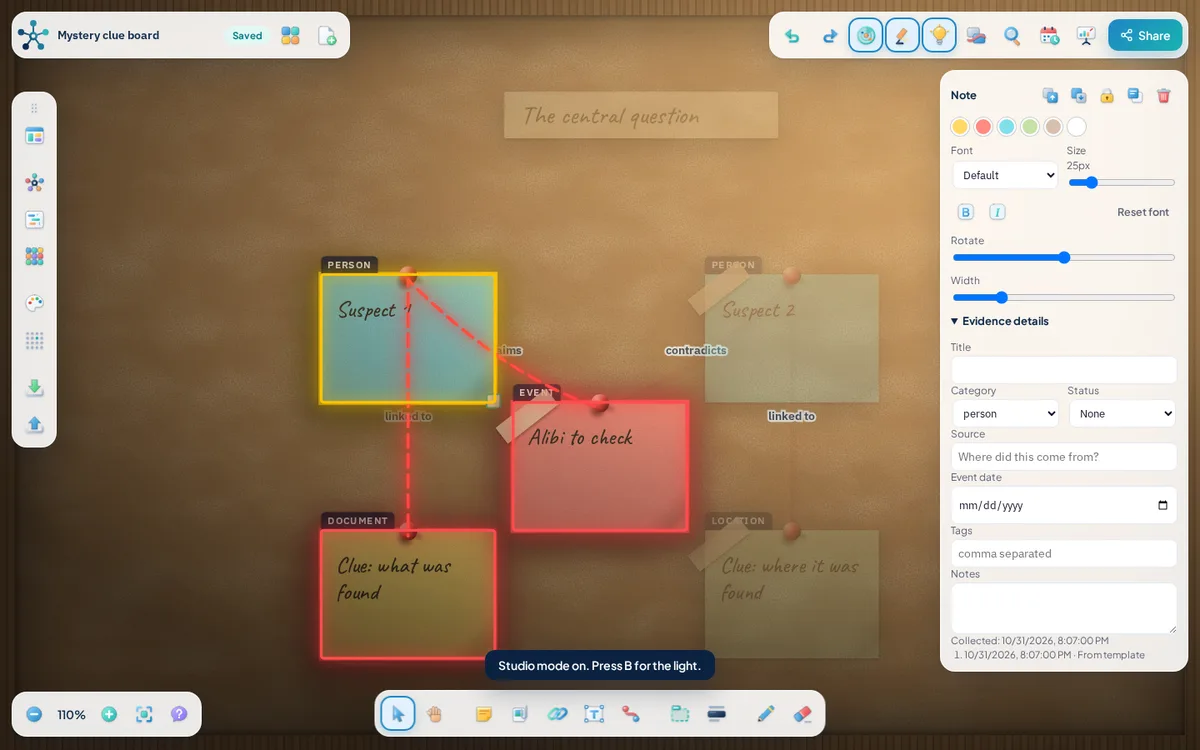
- Glowing links. Select a card and only its direct connections light up. It makes a tangled wall readable.
- Studio mode. Switch to a realistic cork board in a wooden frame, with pinned prints, taped paper notes, a hanging lamp and a light you can turn off. It changes only how the board looks. Everything works the same.
How to get started
- Start from the Mystery clue board template, or open a blank board.
- Add one card for each suspect, clue, place and event.
- String together the cards that belong together.
- Label the strings so you remember why you linked them, and dash the ones you doubt.
- Group related cards inside frames.
- Select a suspect to see exactly what is connected to them, then trace a path between two cards.
A fictional example: the lighthouse keeper
The keeper says he was asleep, but a note about a lit lamp at midnight contradicts him. Connect the keeper to his alibi, the alibi to the lamp, and the lamp to the missing logbook. Selecting the logbook shows every card that touches it, which points you to the next question to ask.
Saving, sharing and export
Boards autosave in your browser on this device and stay there until you clear your site data, so export a board file when a board matters. A share link uploads a copy of the board to our storage, so do not share anything sensitive that way.
You can export a PNG image, save a board file you can import again later, or open a printable case report and save it as a PDF from your browser.
Frequently asked questions
Can I use it for a novel or tabletop game?
Yes. Many people use a clue board to plan mysteries and keep track of suspects, red herrings and timelines.
Can I print or share the board?
You can export a PNG image, save a board file you can import again later, or open a printable case report and save it as a PDF from your browser. Boards autosave in your browser on this device and stay there until you clear your site data, so export a board file when a board matters. A share link uploads a copy of the board to our storage, so do not share anything sensitive that way.
Does it look like the boards in TV shows?
The default Navy board uses pinned photos, handwritten notes and red string. You can switch to a light or slate background.
Related tools
- Evidence board maker: AnacapaChart is a free evidence board that runs in your browser.
- Templates: These starter boards load straight into AnacapaChart, where every card, label and link is editable.
- Relationship map maker: Use AnacapaChart as a relationship mapping tool.
- Guides on evidence boards and link analysis